

Tech one pager
1 - What is Envoy and why should you use it?
Section titled “1 - What is Envoy and why should you use it?”A - Core features
Section titled “A - Core features”| Feature | Description |
|---|---|
| Gifting | Our flagship feature. Enable users to send gift links, then engage their friends with offers while they enjoy the gift. |
| Rewards | Boost results by rewarding subscribers who bring you new users. |
| Marketing links | Generate links you can share with wide audiences in marketing campaigns - including on social media. |
| Analytics and testing | See the detailed funnel from the gift button to new users signing up, and A/B test your way to sharing that works. |
B - Basic user journey
Section titled “B - Basic user journey”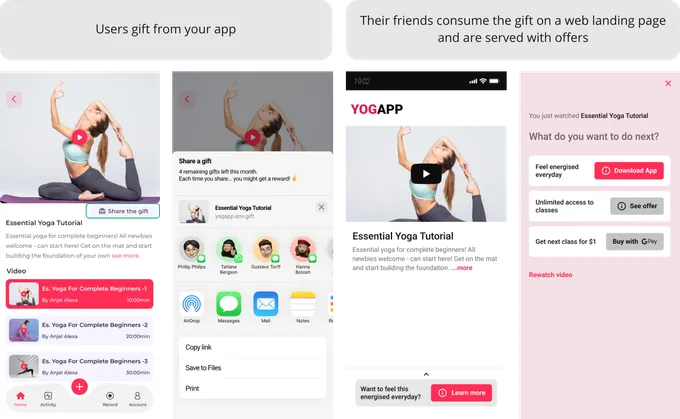
2 - How does it work?
Section titled “2 - How does it work?”A - System flow
Section titled “A - System flow”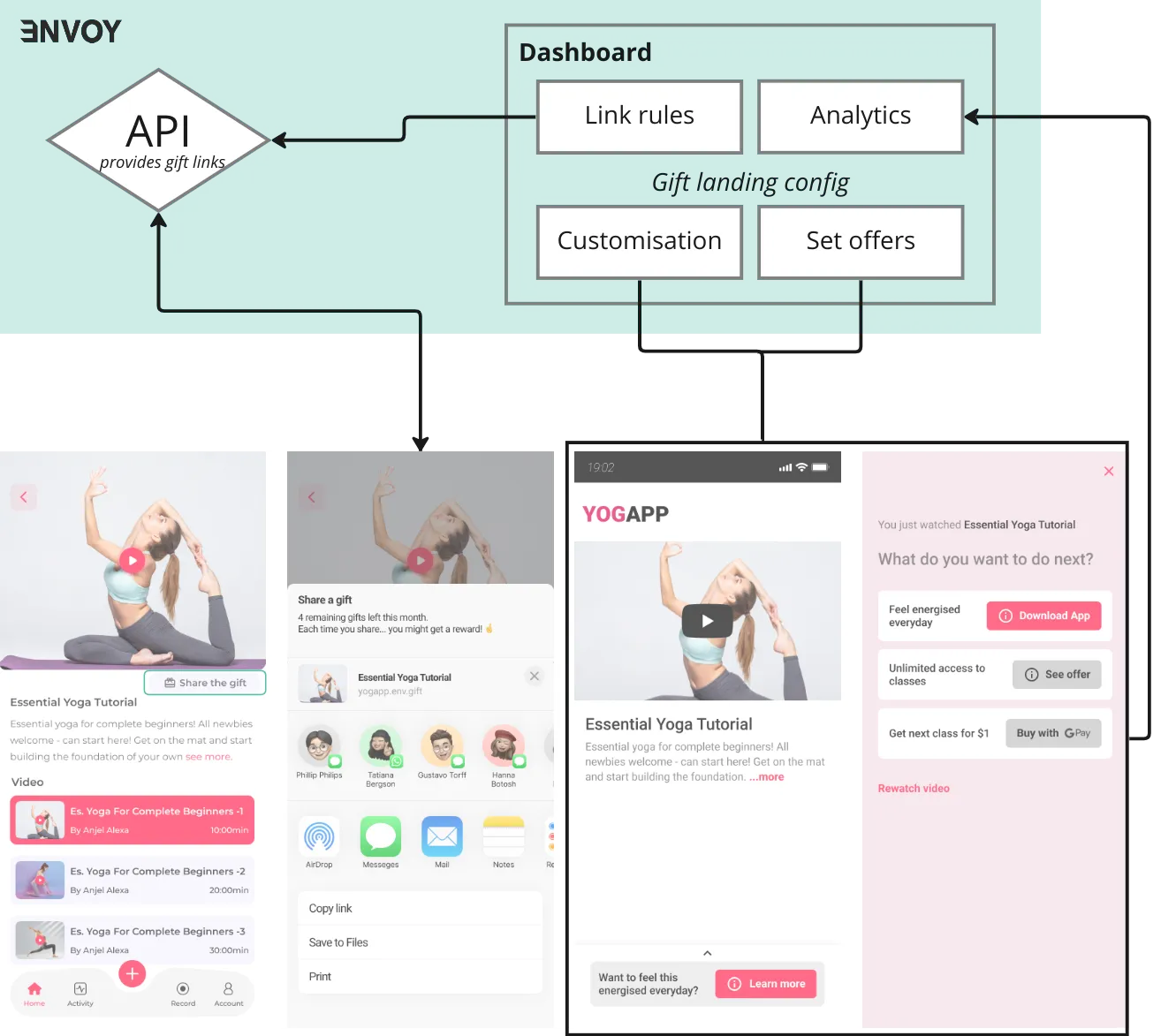
B - Integration: 2 key steps
Section titled “B - Integration: 2 key steps”Getting integration done with those two can take a normal tech team between a day and a sprint depending on your tech stack and in-house resources. We offer integration as a service.
Step 1: Get a link from our API
Section titled “Step 1: Get a link from our API”Python example
import requests
api_key = "-----"API_endpoint = "https://osh7r2l4od.execute-api.eu-west-2.amazonaws.com/prod/partner/create-link"source = "----.mp3"customer_journey_conf = {    'userId': '100',    'contentConfig': {        'contentType': 'VIDEO',        'contentId': 'your-content-id',        'contentName': 'Your content name',        'contentDescription': 'Your content name description',        "common": {            "media": {                "poster": "https://your-poster-uri.com",                "source": source            }        },    }}
response = requests.post(    API_endpoint,    headers={        "x-api-key": api_key,        "Accept": "application/json",        "Content-Type": "application/json",    },    json=customer_journey_conf,)
# response payload
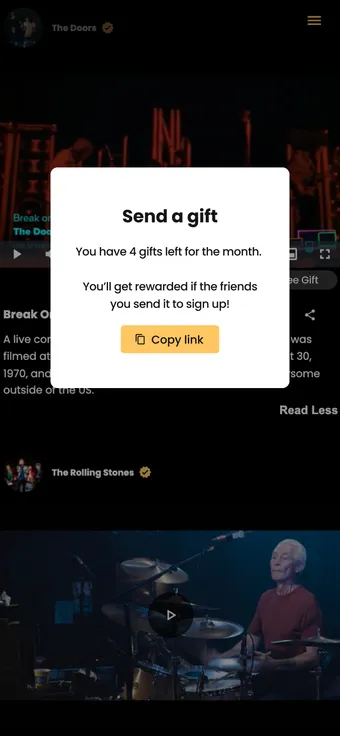
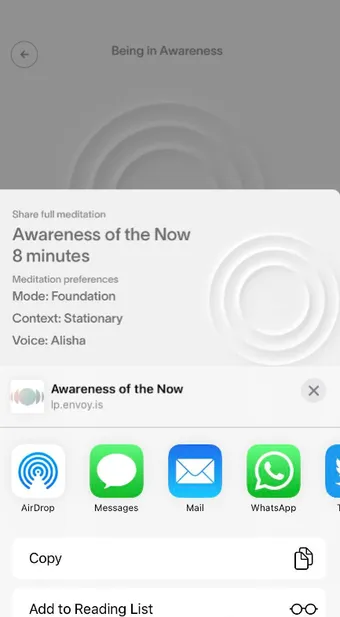
The respond payload contains 2 fields: a url and a userRemainingQuota. It’s key to display both the gift link and # of remaining quotas to the user as shown in step 2.
Step 2: Display gift link and remaining quotas to the user
Section titled “Step 2: Display gift link and remaining quotas to the user”You’ll need to build both a gift button and the modal that appears when that button is clicked. For apps, we recommend using the native modals, and eventually building on top of them.
| Web | Mobile - built on top of the iOS native modal |
|---|---|
 |
 |
3 - Detailed capabilities
Section titled “3 - Detailed capabilities”| Topic | Description |
|---|---|
| Customised gift landing | • Our gift landing is hosted by us and customised by you. You can customise the logo, main colour and theme of the page. • We serve your content in an integrated player that looks great both on web and mobile. |
| Offers | Set up to three offers in the gift landing. Serve different link-out urls depending on device type (web, iOS, Android). Those links can redirect to App store pages or to web urls. |
| Link rules | Control how the content gets shared: • how many times per month each user gets to gift • link expiration: after how much time and many content opens should the link expire |
| Supported media | Video, Audio, HTML or free-form (we render anything via an iFrame) |
| Rewards | Reward flows are either invoked within your app / website or from your CRM system. The system can trigger rewards in the form of 3rd party products & vouchers or more of your product (eg. next month is on us, product voucher or token) |
| Security | • Accepts any DRM settings • User Auth available via cookie or JWT |
| Analytics and tracking | • See key conversion steps from your dashboard, or download the detailed data in a .csv. We use anonymised user_ids to track users in a way that respects their privacy. • We don’t handle personal information and are GDPR compliant |